Jul 10, 2011

Reset Compiz in Ubuntu 11.04

If your window title bar is gone. or you have messed the compiz in any other way in Ubuntu. Just open up a terminal and enter the following command:
gconftool-2 --recursive-unset /apps/compiz-1

Then Logout and Login back.

Edit:
As commented by zwergnase, the above command should also be followed by:
gconftool-2 --recursive-unset /apps/compizconfig-1

Solve -- Xlib: extension GLX missing on display

Recently I was playing with OpenCL in my system. Due to its dependency, I had to mess up with different packages. I even installed Intel® OpenCL™. And suddenly on next boot Something went wrong.
And this is what I did to revert back:
sudo apt-get purge nvidia*
sudo apt-get install --reinstall xserver-xorg-video-intel  libgl1-mesa-glx libgl1-mesa-dri xserver-xorg-core
sudo dpkg-reconfigure xserver-xorg
sudo update-alternatives --remove gl_conf /usr/lib/nvidia-current/ld.so.conf

Hope it helps you too.

Reference:
https://theiszm.wordpress.com/2010/06/27/glx-missing-on-display/

Jun 26, 2011

Save Streamed Flash Video [Firefox-4] [Linux]

It cost me almost half an hour to find the location, where Firefox saves the streamed video. And I made a script for it as I often need it. Here's the script, hope it helps you:

file /proc/$(pidof npviewer.bin)/fd/* | grep -i "flash" | \
  cut -d':'  -f1 | xargs -i{} cp {} ./ 

Details of what the command will do:
Fifefox-4 uses an external process (npviewer.bin) to manage external plugins. So what I did was grabbed a copy of the deleted flash file (yea it deletes the file, but keeps a secret opening for itself) from npviewer.
Finally all the cached video are copied to current path named with some random numbers (technically, the number is file-descriptor).

Warning: Execute the command after complete streaming and before closing the firefox(-tab).

Apr 4, 2011

Nikon Intervalometer using Nepaluino (Arduino)

Recently I got a chance to attend the first Nepaluino workshop (Sincere thanks to Ujwal Shrestha). It was real fun to program Nepaluino with hackers.
For those who don't know what Nepaluino is: its a Arduino clone. More on this from the founder of Nepaluino -> here

Few days after that we decided to build Intervalometer using Nepaluino. As I own a Nikon D90, I set myself to build one for it. Thanks for the help, Ujwal.

So lets start.
First connect the Circuit. Its pretty easy Just connect the Nepaluino digital pin-13, the IR transmitter, the resister and the Ground in series.

Next compile the following code in Arduino IDE and upload to Nepaluino.
int pinIRLED = 13;                                      // assign the Infrared emitter/ diode to pin 13
void setup() {
  pinMode(pinIRLED, OUTPUT);                            // set the pin as an output
}
// sets the pulse of the IR signal.
void pulseON(int pulseTime) {
  unsigned long endPulse = micros() + pulseTime;        // create the microseconds to pulse for
  while( micros() < endPulse) {
    digitalWrite(pinIRLED, HIGH);                       // turn IR on
    delayMicroseconds(13);                              // half the clock cycle for 38Khz (26.32×10⁻⁶s) - e.g. the 'on' part of our wave
    digitalWrite(pinIRLED, LOW);                        // turn IR off
    delayMicroseconds(13);                              // delay for the other half of the cycle to generate wave/ oscillation
  }
}
void pulseOFF(unsigned long startDelay) {
  unsigned long endDelay = micros() + startDelay;       // create the microseconds to delay for
  while(micros() < endDelay);
}
void takePicture() {
  for (int i=0; i < 2; i++) {
    pulseON(2000);                                      // pulse for 2000 uS (Microseconds)
    pulseOFF(27850);                                    // turn pulse off for 27850 us
    pulseON(390);                                       // and so on
    pulseOFF(1580);
    pulseON(410);
    pulseOFF(3580);
    pulseON(400);
    pulseOFF(63200);
  }                                                     // loop the signal twice.
}
void loop() {
  takePicture();                                        // take the picture
  delay(5000);                                          // delay in milliseconds which allows us to do timelapse photography - 1 second = 1000 milliseconds
}
Thats it. Now your Intervalometer is ready. It clicks the shutter every 5 secs. Notes: Compatible with: All Nikon Cameras supported by ML-L3

Ref: Arduino – IR remote/ intervalometer for Nikon D80 DSLR

Oct 10, 2010

Connect to internet using Ncell Connect (E1550)

First of all sincere thanks to Amit for providing me his Ncell-Connect dongle to try it out in linux.

Ncell has recently launched a data service in Nepal called Ncell Connect. Ncell provides E1550 dongle to to its user. E1550 is uses a Switchable USB Device (storage cum serial device).
In linux, it is detected as storage device only, and one, need to switch the device to modem mode.
So here's, how to install it in ubuntu(linux).
1. Install "usb-modeswitch"
2. Instruct Udev to call mode-switcher whenever the device is plugged in:
Update: Command to switch to root Privilege added.
sudo -s
apt-get install usb-modeswitch
cat > /etc/udev/rules.d/99-ncell-connect.rules <<EOT
# Ncell Connect switch mode to usbserial (E1550 device id => 12d1:1446)
SUBSYSTEM=="usb", ATTRS{idProduct}=="1446", ATTRS{idVendor}=="12d1", RUN+="/lib/udev/modem-modeswitch --vendor 0x12d1 --product 0x1446 --type option-zerocd"
EOT

3. Insert the device.
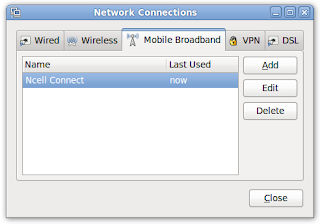
4. Create a new "Mobile Brodband" connection
4.1 Goto System->Preferences->Network Connections
4.2 Goto "Mobile Brodband" Tab

4.3 Create a new "Mobile Brodband" connection, following are the details that you require:
Device: HUAWEI Technology HuAWEI Mobile [if the list is empty, you messed up Something wrong, Restart from step 1]
Country: Nepal
Service Provider: Ncell
APN: web
Number: *99#
Leave other fields empty.

That's it. Enjoy!!
Happy Dashain

Jun 9, 2010

Convert ascii text to hex in linux (bash)

If you want to convert your ascii text to hex, fire up the bash-terminal and enter the following command:
$ echo -n 'text' | xxd -ps | sed -e ':a' -e 's/\([0-9]\{2\}\|^\)\([0-9]\{2\}\)/\1\\x\2/;ta'

Mar 2, 2010

solve temporary file issue with amavis

Problem:
amavis[6872]: (!!)TROUBLE in process_request: Can't create file /var/lib/amavis/tmp/amavis-20100302T122841-06872/email.txt: File exists at /usr/sbin/amavisd-new line 4856

Solution:
 # perl -MCPAN -e shell;
 cpan> install File::Temp

Dec 23, 2009

Format Numbers to be Comma Separated

I have a number 1234567890, and I want to insert a comma at the gap of three digits like this:1,234,567,890

If this is the problem running in your head then the following one liner will be helpful to you.

$ echo "1234567890" | sed -e ':a' -e 's/\(.*[0-9]\)\([0-9]\{3\}\)/\1,\2/;ta'
1,234,567,890

Dec 15, 2009

Convert VOB to AVI using ffmpeg

Suppose you have a myVideo.vob and you want to convert to avi format.
Open a terminal and execute the following command

$ ffmpeg -i myVideo.vob myvideo.avi

Possible errors:
1 "ffmpeg: symbol lookup error: ffmpeg: undefined symbol: avcodec_channel_layout_num_channels"
Solution:
$ export LD_LIBRARY_PATH=/usr/local/lib/ && ffmpeg -i myVideo.vob myvideo.avi

If this doesnt solve the problem then retry that after installing the libavcodec52 and libavutil49 packages:
$ sudo apt-get install libavcodec52  libavutil49

Sep 29, 2009

Bulk upload photos to facebook [BASH]

I got tired of uploading one photo at a time. So I googled a bit, and found few scripts but none did convince me. So I set to write one by myself. And my focus was to keep it short and simple(KISS).

The tool is a python script with following features:
* Bulk upload the pictures to facebook.
* Supports upload from specified folder or current folder (default).
* Allows to choose from available albums.

Usage:
upload2facebook [-a|--aid <album_id>] [<path>]

Install:
(Don't forget to read the notes below)
In Debian (Ubuntu, Kubuntu,...) system:
1. Install from ppa https://launchpad.net/~ssapkota/+archive/ppa
2. Install directly from deb-package -> upload2facebook_0.2_i386.deb , Package Detail

In RPM (Fedora, Centos) system
3. Install the rpm -> http://ssapkota.com.np/downloads/upload2facebook-0.2-2.i386.rpm

4. Get the source, do whatever you like -> upload2facebook_0.2.tar.gz


Note-1:
During the installation of this tool, it will ask you to enter the Application Key and Application Secret Key. To get this two key you need to register an application for yourself at facebook. Follow the following (necessary) steps:
1. Go to http://www.facebook.com/developers and click on Setup Up New Application at the top right corner.
2. Enter the Application Name (I suggest : Photo Uploader)
3. Then click Agree and then Save Changes
4. After this you will get
API Key and Secret. Copy it and save it somewhere; you'd need later. Remember, these keys are meant to be secret and shouldn't be shared (So, did I ;) ).
5. You need to do one more thing to make it work; On the left-navigation click on the Canvas and then enter a URL(may be your website/blog link) as Canvas Callback URL. I don't think this is of any use for command line application, but to make the application work you need to set this.
6. Thats it. Return to the installer and Enter your App Key and App Secret.

Note-2:
1. The tool is developed and tested in Ubuntu and works in all the Debian system.
2. The RPM package is generated using alien and have not been tested.
3. The code is written in python and is OS independent, One can easily port to any other Operation system.
4. If you have tested the tool in other system or have ported it to other OS, please post the status in the comment.

Enjoy the tool. :)

Jun 29, 2009

Verify IPV4 address in php using regex

A simple function in php to verify IPV4 Address. It is completely based in regex and does full ip verifying.
It tests the ip for;
1. Need 4 numeric blocks separated by a dot.
2. Each numeric block must noot exceed 255.
3. Shouldn't contain space. So remember to trim before calling this function.


function isINetAddress($ipaddr){
if( preg_match( "/^((?:25[0-5]|2[0-4][0-9]|[01]?[0-9]?[0-9]).){3}(?:25[0-5]|2[0-4][0-9]|[01]?[0-9]?[0-9])$/m",$ipaddr) > 0)
return true;
}


This can't me more simpler. ;)
Enjoy!

May 24, 2009

Bluk rename files in Linux

Today one of my friend asked me to bulk rename all files in a folder. He had a collection of songs named randomly with no extension. He also wanted to add the extension, mp3 in all files(Yes, he was sure about the encoding)
I opened a terminal in that folder and executed the following command.
NUM=1
for SONG in ./*
do
mv $SONG song$NUM.mp3
let NUM=NUM+1
done

So lets peek what the above script does:
  1. Defined a variable NUM and initialized it with 1.
  2. Defined a foreach loop. Here for each files in current path the for loop is executed.
  3. Rename(move) the file $SONG to song<num>.mp3
  4. Increase the value of variable NUM by 1.
  5. end. ;)
So if you want to rename in a different fashion you can hack the line mv $SONG song$NUM.mp3 in any way you like. But Remember the second argument to the mv command must vary for each loop, otherwise you will end up deleting all files except the last one.

May 11, 2009

Solve no sound problem in Ubuntu

One after another 17 days have passed.. till today my laptop was completely silent when i booted into Ubuntu. But now, just 10 mins back, after a lot of hit and trial with driver model, I could make make my laptop speak. Here's what I did.
Though I specified this as ubuntu problem in title, it the problem of alsa; it's not recognizing your device.

I completely forgot what I did to mess up my laptop-sound-system, so i thought to start afresh.
I removed the alsa and pulseaudio completely. And One thing I would like to mention: I am completely unfamiliar about the interaction of alsa and pulseaudio with the sound system. This is my first deal with sound system of linux to this depth.
sudo apt-get --purge remove linux-sound-base alsa-base alsa-utils \
"pulseaudio-*"

Then I did a quick Reboot; just playing safe. (Jaunty boots on/off so fast, I am fan of it.)
Next I reinstalled the alsa with pulseaudio.
sudo apt-get install linux-sound-base alsa-base alsa-utils \
libasound2-plugins "pulseaudio-*" paman padevchooser \
paprefs pavucontrol pavumeter

Then, I appended following lines to the file /etc/modprobe.d/alsa-base.conf
alias snd-card-0 snd-hda-intel
alias sound-slot-0 snd-hda-intel
options snd-hda-intel model=dell-m6
options snd-hda-intel enable_msi=1

The bold faced "model=dell-m6" was the main hack for the system to work.

Then after another quick boot, I got the sound.

During this I refered a lot of pages, But the most useful and the one that is well documented is: Comprehensive Sound Problem Solutions Guide
And this is the page where I got the model of the sound-card(dell-m6) from.

Apr 30, 2009

Utilize Grep Sed and Awk

In this post I will list commands that I use and include at least one of grep,sed or awk.
  • cat filename | grep "phrase"
    Search line containing phrase in file
  • cat filename | grep -v "phrase"
    Search line not containing phrase in file
  • cat filename | grep "phrase1\|phrase2"
    Search lines containing phrase1 or phrase2 in file.
  • sed -i "s/phrase1/phrase2/g" ./filename
    Replace phrase1 with phrase2 in file.
  • sed -i "s/[ ]*\(.*\)[ ]*/\1/g" ./filename
    Trim spaces of each line of the file.
  • awk '{if($7=="2") $7="5"; print;}' file
    Conditional modification. Field no.7 is is replaced by "5" if it is "2". The default field seperator is .
  • uptime | awk 'BEGIN {FS=" "} { gsub(",",""); if (index($0,"day")) {gsub(":"," hours, ",$5);print $3" "$4", "$5" minutes"} else {gsub(":"," hours, ",$3); print $3" minutes"}}'
    Get the Uptime in a proper and clear format.
  • ls | grep -v 'file or folder or regex' | xargs -I{} mv {} /target/folder/
    Move all but one to /target/folder. You can also use it to move all the files/directories in current directory to another directory in the same path.Be Aware: The Target directory should exist. Just to be at the safe side, I suggest not to miss the slash (/) at the end. This will give you warning/error if you messed up something.


For now I have just listed few that came in my mind; just thought to prepare a seed.
I'll promise to grow this list as soon as they come to my mind.

Note: If you have some commands in your mind, that you regularly use, plz post it as comment.

Mar 24, 2009

make scite, a default editor in gnome

Personally, I prefer scite over gedit (The one that is included by default in gnome). So soon after every system upgrade (fresh installation), I simply remove gedit and install scite:
sudo sh -c "apt-get -y remove gedit && apt-get -y install scite"

Now to make it a default text editor run:
sudo update-alternatives --install /usr/bin/gnome-text-editor \
gnome-text-editor /usr/share/scite 1

Feb 17, 2009

Terminal tool for websms (NTC service)

Websms is a service provided by NTC.
It is service that allows us to send 10 SMS per day via its web-interface.

Each time when I need to send a SMS, I had to open the site,login(no auto remember facility) and send SMS. So I thought to create a tool that would save time.

You can download the debian package from here: websms_1.01_all.deb

Install it using:
dpkg -i ./path/to/websms_1.01_all.deb

Synopse:
websms help
This displays the help for this tool.

websms addcontact <nick> <Mobile Number>
You can store the mobile number with (nick)name in the contacts list. Later you can use the (nick)name to send SMS to him/her.

websms viewcontacts
You can view the complete list of your contacts.

websms send <nick | Mobile Number> <Message>
Send the SMS by Mobile Number or by (nick)name that you stored earlier.The message length cannot exceed above 142.

Examples:

  • $ websms addcontact sweety 98********

  • $ websms send sweety "I will be late."

  • $ websms send 98******** "Call me back. --suraj"

  • $ cat joke | websms send 98********

    Be sure that the size of file "joke" doesnt exceed 142 bytes.

  • $ websms viewcontacts


Enjoy!

Note:The secure-info and the contact-list are located in ~/.websms directory.

EDIT:
On the request of you Guys I have added the RPM package too:

Direct Download Link:websms-1.01-2.noarch.rpm
[Note:The RPM package was generated with alien.]

Jan 5, 2009

Search with single click

Searching cant be any more easy than this.Just select and click.
Here is how you can search anything you select with just a single click.
First install this package "googlizer"
apt-get install googlizer

Just drag it to the panel(from Applications->Internet) for easy access and enjoy.
Select any text anywhere and just click on it.

You can even use it with other links.. May be answers.com or wikipedia.org. Here's, how you do it.

Right click on the googlizer button on the panel and open its properties. And in the command text area type the following to convert it to answerizer ;)
googlizer -u "http://www.answers.com/topic/"

If you want to look it better click on the googlizer Icon at the top left of the properties dialog and change it as you want.

The core thing that the googlizer does is just copies the text in X'selection and appends it to the end of the link that you provide, and finally opens it in Browser. If you do not provide any link then it uses "http://www.google.com/search?q=".


For Wikipedia-izer, whatsoever,
googlizer -u "http://en.wikipedia.org/wiki/"


*Please leave in comment if you use it for any other.

Dec 28, 2008

gegls in Ubuntu

Got to know about this easter-egg-thing in ubuntu.
A virtual Easter egg is an intentional hidden message or feature in an object such as a movie, book, CD, DVD, computer program, web page or video game.

This is just a funny hidden game.
Open the Run application Dialog using ALT + F2 and then type "gegls from outer space" without the quotes and then just hit Enter.

The game pops up.
Screenshot:


Enjoy the game!

Got it from ester egg archive.

Dec 17, 2008

Schedule a job in cron

For the task that you have to run regularly in some period, scheduling it in the cron is the one and only way for it.
For this run this in terminal:
crontab -e

This will start the vi editor and load the current cron table file for this user, or a blank file if none exists. In a new line type the following

A B C D E < path to the script > [Arguments if any]


Where:

  • A = minute of the hour

  • B = hour of the day

  • C = day of the month

  • D = month of the year

  • E = day of the week


Example:
To schedule a Task daily at 9 in the moring that lies in /home/sata/script. I use the following.
0 9 * * * /home/sata/script

Nov 15, 2008

solve "Communications link failure" in matlab

Recently while i was working on my project in matlab. I got the following error.
Connection failed: Communications link failure

Last packet sent to the server was 0 ms ago.
??? No constructor 'com.mathworks.toolbox.database.closeTheDatabaseConnection' with matching
signature found.


After I lost 2 hrs of my time, I remembered I had gone through the same error in Hibernate/mysql.

The solution is so simple:
Just comment out the following line in my.cnf(the mysql configuration file). :)
skip-networking

so that it looks like this:
#skip-networking


Finally restart the service mysql.

To know why see my earlier post:http://howtoxyz.blogspot.com/2008/09/solve-commysqljdbccommunicationsexcepti.html